DataEditR 2.0 is a rewrite of the data editor. The
grid is now built on the MIT-licensed Tabulator JavaScript library instead
of rhandsontable, the user interface has been redesigned
around a single toolbar, and the editor can now edit tables stored in
databases. Code that uses data_edit() keeps working: all
arguments are unchanged, only the defaults of theme and
logo look different.
Highlights
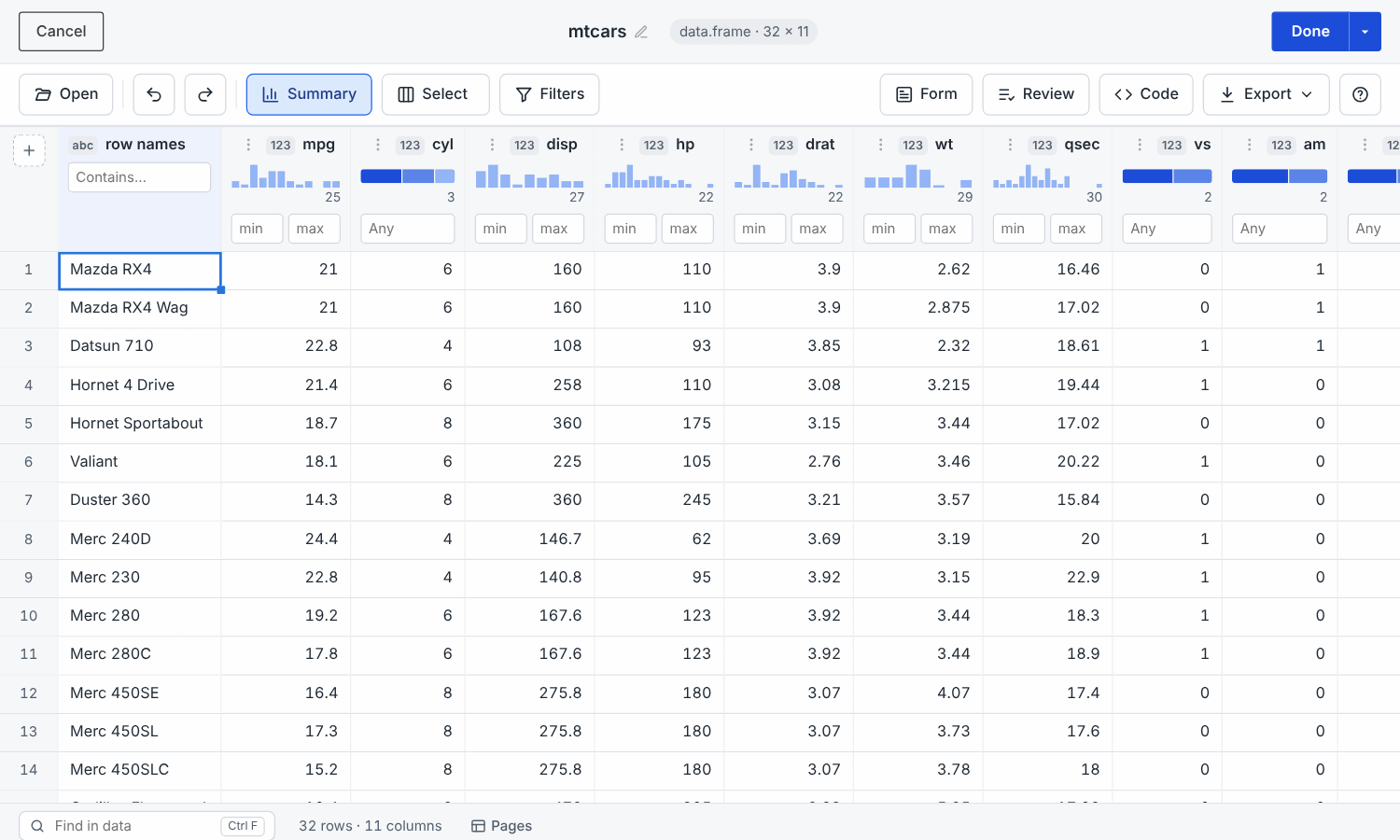
- Fast with large data. Edits are sent to R as cell-level changes instead of whole tables and only the visible rows are drawn, so an edit on a 100,000 row table takes tens of milliseconds.
-
Undo and redo for every change (
Ctrl+Z/Ctrl+Y), including pasted ranges, fills, added or removed rows and columns and renamed columns. -
Spreadsheet-style editing: range selection, copy
and paste to and from Excel, Google Sheets and other software (rows are
added when a pasted block is longer than the table, and formatted
numbers and dates are converted),
Deleteto clear a range, and a fill handle to drag that copies values or carries on series such as1, 2, 3, dates orWeek 1, Week 2(Ctrl+Dfills down). Pastes wider than the table add columns. -
More column types in
col_options: date-times, times, text over several lines, web addresses, colours (with a colour picker that knows R’s colour names), numbers within limits, sliders and star ratings, as well as checkboxes, dropdown menus, dates and passwords. -
Review changes: a panel listing every edited,
added, removed or renamed cell, row and column with a button to revert
it, and a
Codetab with the code that reproduces your edits, updated as you edit. -
Column actions: formulas
(
round(mpg * 0.425, 1)as a new column), find and replace, recoding values, changing types and sorting from a column’s menu, each previewed and shown in the code as onedplyrverb. - Column summaries: a histogram or the most common values, the share of missing values and the number of distinct values under each column name. Click a bar to show those rows, or the missing share to show the rows with missing values.
-
Record form: a
Formtab shows the selected row as a form, to enter or check data one record at a time. -
Comments on cells: right-click a cell (or press
Shift+F2) to leave a comment, returned with the data asattr(x, "comments"). -
Labelled data: SPSS, Stata and SAS files are read
and written with
haven, and their variable labels, value labels and missing values are shown, edited (Labels...in a column’s menu) and kept in the returned data and the code. Typing or pasting a label stores its value. -
Validation rules:
rules = list("End is after the start" = ~ end >= start), or required, unique, limits and patterns from a column’s menu. Cells that break a rule are marked and listed in aProblemstab, andDoneasks before returning them. -
History and change log: a
Historytab lists every change with when it was made and by whom, and each step can be given a note saying why.data_edit(log = "changes.csv")keeps this record in a file and lists the earlier sessions kept in it, anddataEditCommit()returns it in shiny apps. -
Unsaved changes are kept: changes are saved as a
draft while you edit, so if the editor is closed without pressing
Done(or R crashes) you are offered your changes the next time you open the same data.Cancelasks before changes are thrown away. -
Filters under the column headers (ranges for
numbers, value lists and text search), and a
Filterspanel beside the grid that lists every filter in one place for complex combinations: histograms with a range to drag for numbers and dates, value lists with counts, matching all or any of the filters, and all the logics of earlier versions. The grid follows the panel as you change it. Active filters are shown as chips in the toolbar. -
Pages of rows and columns for large data
(Pages in the status bar, or
page_rowsandpage_cols), and the data can be renamed by clicking its name in the header. -
Find (
Ctrl+F), a status bar with the sum, mean and count of the selected cells, and a sheet of keyboard shortcuts (?). -
Safer typing and pasting: text in a number, date or
TRUE/FALSEcolumn, or a value outside a column’s options or limits, makes the editor ask whether to storeNA, convert the column to text or cancel, instead of silently converting the column. - Types are preserved: numbers, dates, logicals, factors (with their levels) and text that looks like a number keep their type, and matrices, tibbles and data.tables are returned with their original class.
-
Tables too big to load: database tables are loaded
100,000 rows at a time, and
Rowsin the toolbar loads the rows matching a filter, sorted by a column, with the database doing the work. Queries that cannot be written back (SQL, joins, Parquet files through DuckDB) open read-only. -
Databases: pass a
dbplyrtable (e.g.data_edit(tbl(con, "cars"))) to edit it in place. Changes are written in a single transaction after you confirm them, with checks for changes made by others. Seevignette("databases"). -
Saving from shiny apps:
dataEditCommit()saves the changes made in adataEditServer()editor (writing them to a database when the data is a database table) anddataEditChanges()counts the changes that have not been saved yet. Seevignette("shiny-modules").
Where did everything go?
If you used earlier versions of DataEditR, this is where the controls of the old interface have moved to:
| DataEditR 1.x | DataEditR 2.0 |
|---|---|
| “Data to edit” box and file upload |
Open menu in the toolbar |
| Filter button (funnel) |
Filters panel, or the boxes under the column
headers |
| Select columns button (crosshairs) |
Select menu, or Hide column in a column’s
menu |
| Sync button | not needed: edits to filtered data apply to all data |
| Cut button (scissors) |
Done menu: return all data or only what’s on
screen |
| Download buttons |
Export menu: all data or only what’s on screen |
| Blue borders around changed cells | blue tint (track = TRUE), plus the review panel |
Behaviour changes
- The default theme is a Bootstrap 5 theme
(
theme = NULL). Bootswatch names such as"yeti"now select the Bootstrap 5 version of the theme, and custombslib::bs_theme()objects should useversion = 5. - No logo is shown by default. Supply the path or URL of an image to
logoto show one. -
col_optionsno longer disables adding or removing columns. -
col_readonlycolumns are locked in the grid (shown with a lock) rather than reverted after editing. - Only empty template columns and new columns are passed through
type.convert()when the data is returned, so character columns such as"001"are no longer converted to numbers. Their cells that were never filled in are returned asNArather than empty strings. - Factor columns are returned as factors with their original levels
(new values become new levels after them). Earlier versions returned
them as text unless
col_factor = TRUE;col_factor = TRUEnow only turns character columns into factors. -
"NA"typed into a number, date or logical column is a missing value. -
Cancelasks for confirmation when there are changes, anddata_edit()saves drafts of unsaved changes (autosave = TRUE). - A filter that matches no rows shows an empty table rather than all rows.
-
betweenandnot betweenfilters include their end points (they were left out before), andcontainslooks for plain text and ignores case. Usematches the patternfor regular expressions. - Cancelling the RStudio add-in returns the highlighted data rather
than
NULL.
Dependencies
rhandsontable, shinyBS and
miniUI are no longer needed. The forked version of
rhandsontable that earlier versions required is therefore
no longer required either. DBI, dbplyr and a
database backend (e.g. RSQLite) are only needed to edit
database tables.
DataEditR remains licensed under GPL-2. It bundles
Tabulator 6.7.1 (MIT licence) and icons based on Lucide (ISC licence),
both compatible with GPL-2; the COPYRIGHTS file installed
with the package lists their copyright notices.
Shiny modules
-
dataEditUI()gainsheight,toolbar,toolbar_leftandtoolbar_rightarguments to control the layout around the grid. -
dataEditServer()gainsrowsandcolumnsarguments to show part of the data; edits apply directly to the complete data, sorow_indexanddataSyncare no longer needed. The returned reactive carries a"view"attribute with only the rows and columns on screen. - New
dataEditCommit()saves the changes made in the module: database changes are written in a single transaction and the rows read back, and for other data the current data becomes the new starting point.dataEditChanges()summarises the changes that have not been saved yet. -
dataFilterServer()anddataSelectServer()gain aresetargument anddataSelectServer()returns the selected columnnames.
See vignette("shiny-modules") for examples, and the changelog
for the full list of changes.