Manual data entry and editing in R can be tedious, especially if you have limited coding experience and are accustomed to using software with a Graphical User Interface (GUI). DataEditR is an R package built on shiny and the MIT-licensed Tabulator JavaScript library that makes it easy to interactively view, enter, filter and edit data, including tables stored in databases. If you are new to DataEditR visit https://dillonhammill.github.io/DataEditR/ to get started.
Installation
DataEditR can be installed from CRAN:
install.packages("DataEditR")The development version of DataEditR can be installed directly from GitHub:
library(devtools)
install_github("DillonHammill/DataEditR")
Usage
Supply your data to data_edit() to open it in the data editor, make your changes and press Done to get the edited data back. The animation below edits cells, fills down a selection, adds a row, renames a column, filters rows, hides columns, finds values, undoes and redoes, reviews and reverts changes, shows the code that reproduces the edits and returns or saves the data from the Done menu:
library(DataEditR)

# Edit mtcars, save the result to an R object and a csv file
mtcars_new <- data_edit(mtcars,
                        save_as = "mtcars_new.csv")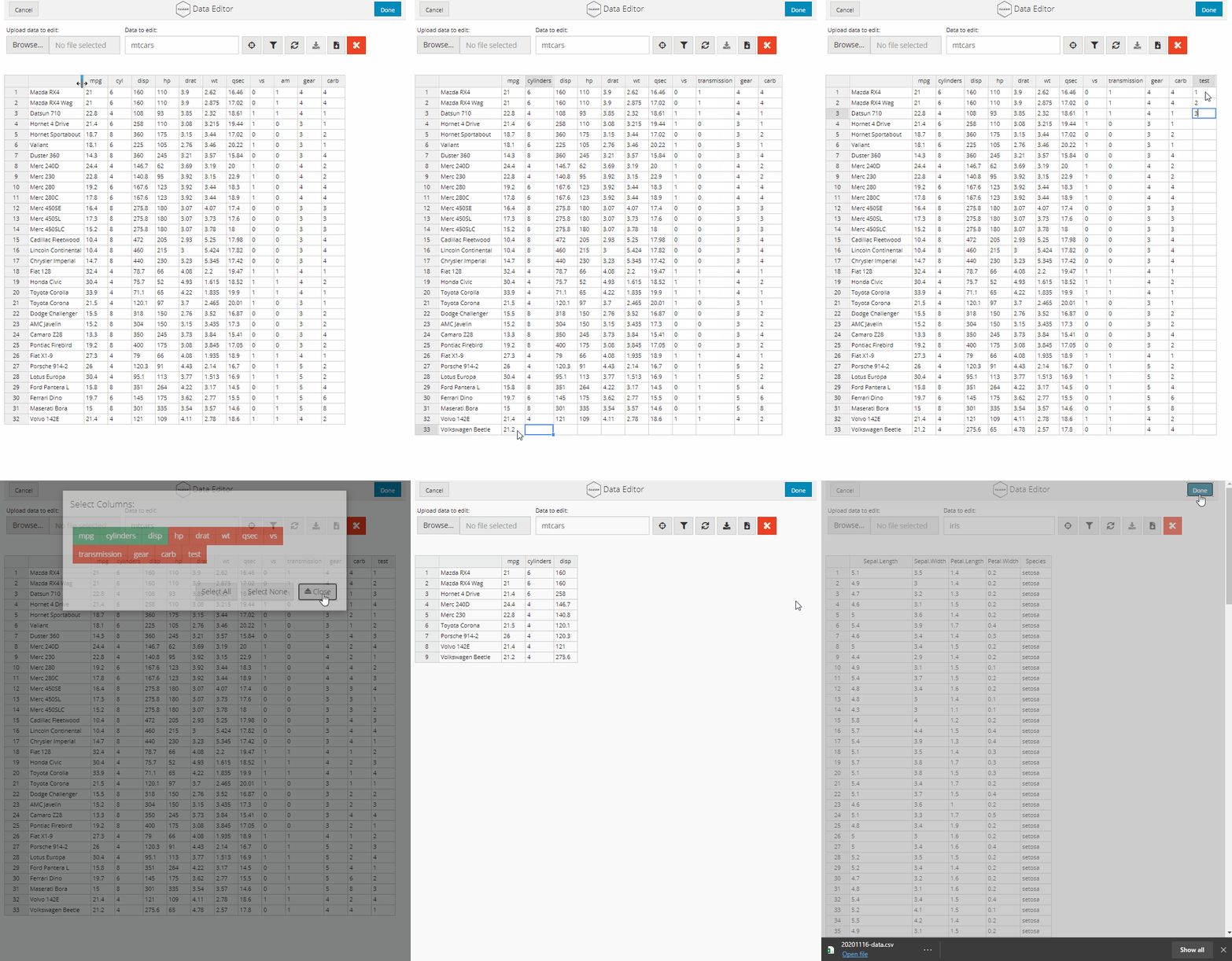
data_edit() works with data frames, matrices, tibbles, data.tables, files (read with any reading function) and database tables, and can create new tables from scratch. It is also available from the RStudio Addins menu as Interactive Data Editor. The editor is built from shiny modules, so you can add it to your own shiny applications with dataEditUI() and dataEditServer(), save the changes (including to databases) with dataEditCommit() and count unsaved changes with dataEditChanges(). data_code() generates tidyverse-style code that reproduces your edits.
General features:
- RStudio add-in: highlight the name of a dataset and open it in the editor
- flexible display options (either
dialogbox,browseror RStudioviewerpane) - fast, even with large data: only the visible rows are drawn and edits are sent to R cell by cell
- edit tables in a database directly (
dplyr::tbl()ordb_table()), with changes written in a single transaction after you confirm them - tables bigger than memory: rows are loaded on demand, filtered and sorted by the database
- ability to interactively create data.frames from scratch
- load tabular data saved to file using any reading function (e.g.
read.csv()) - open other R objects, files or a new table without leaving the editor
- save edited data to file using any writing function (e.g.
write.csv()), or export all data or only what is on screen - return appropriately formatted data as an R object for downstream use, keeping column types and the class of the data
- review panel listing every change with one-click revert, and live tidyverse-style code that reproduces your edits (
data_code()) - a summary under each column name (histogram or most common values, missing values, distinct values) whose bars filter the rows
- a form to enter or check data one record at a time
- SPSS, Stata and SAS files and labelled data: values are shown and entered by their labels, and variable labels, value labels and missing values are kept
- formulas, find and replace, recoding, type changes and sorting for whole columns, each shown in the generated code as one
dplyrverb - validation rules (required, unique, limits, patterns or any formula), with problem cells marked and listed before you press
Done - a history of every change with who made it and when, notes saying why, and a change log kept in a file (
log) - unsaved changes are kept as a draft and offered again if the editor is closed or R crashes
- support for custom themes through the
bslibpackage - customisable user interface (title, logo, menus)
- shiny modules to use the data editor in your own applications, with
dataEditCommit()to save changes (including to databases),dataEditChanges()to count unsaved changes,dataEditProblems()for broken rules anddataEditLog()for the change log
Data editing features:
- undo and redo (
Ctrl+Z/Ctrl+Y) - edit cells, row names and column names
- add or remove rows and columns from the context menus
- range selection, copy and paste to and from spreadsheets (Excel, Google Sheets, LibreOffice), with rows and columns added as needed and formatted numbers and dates converted, a fill handle that copies values or carries on series, fill down (
Ctrl+D) and clearing of selected cells - comments on cells, returned with the data
- filter rows by typing under the column headers (ranges, value lists, text) or build complex filters in the
Filterdialog - show or hide columns from the
Selectmenu - find values in the data (
Ctrl+F) - status bar with row/column counts and a sum/mean/count of the selected cells
- asks before a typed value would turn a number or date column into text
- edits to filtered data are applied directly to the complete dataset
- change tracking to visually highlight edited and added cells (
track) - column types to simplify user input: checkboxes, dropdown menus, dates, date-times, times, text over several lines, passwords, web addresses, colours (with a colour picker), numbers within limits, sliders and star ratings
- read-only and hidden columns
- support for factor columns: edited as text and returned as factors with their levels
- control over which rows, columns and column names can be edited
- manual column resizing and stretching columns to fill the available space
- programmatically add columns or rows to data prior to loading into the data editor
Visit https://dillonhammill.github.io/DataEditR/ for the user guide and articles on editing database tables and using DataEditR in shiny applications.
Credits
DataEditR is built using the fantastic Tabulator JavaScript library by Oli Folkerd (MIT licence). Earlier versions of DataEditR were built on the rhandsontable package. The user interface of DataEditR has been inspired by the editData package which is a great alternative to DataEditR.
Licence
DataEditR is released under the GPL-2 licence. It bundles the Tabulator JavaScript library (MIT licence) and icons based on Lucide (ISC licence); see the COPYRIGHTS file for their copyright notices.
Code of Conduct
Please note that the DataEditR project is released with a Contributor Code of Conduct. By contributing to this project, you agree to abide by its terms.
Citation
If you use DataEditR in your work, please cite the package as follows:
citation("DataEditR")
#> To cite package 'DataEditR' in publications use:
#>
#>   Hammill D (2026). _DataEditR: An Interactive Editor for Viewing,
#>   Entering, Filtering & Editing Data_. R package version 2.0.0,
#>   <https://dillonhammill.github.io/DataEditR/>.
#>
#> A BibTeX entry for LaTeX users is
#>
#>   @Manual{,
#>     title = {DataEditR: An Interactive Editor for Viewing, Entering, Filtering & Editing Data},
#>     author = {Dillon Hammill},
#>     year = {2026},
#>     note = {R package version 2.0.0},
#>     url = {https://dillonhammill.github.io/DataEditR/},
#>   }